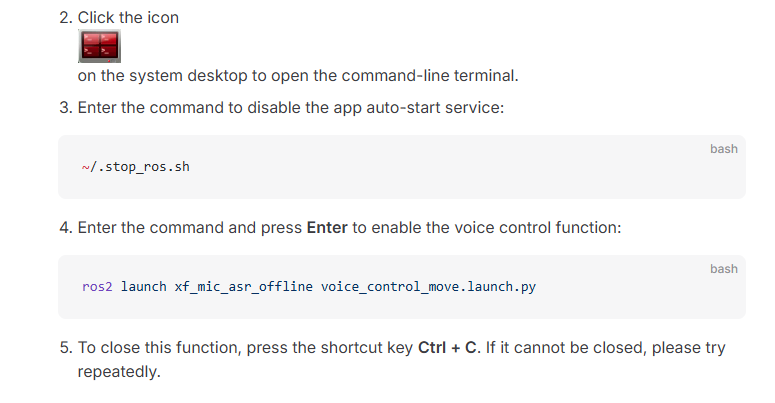
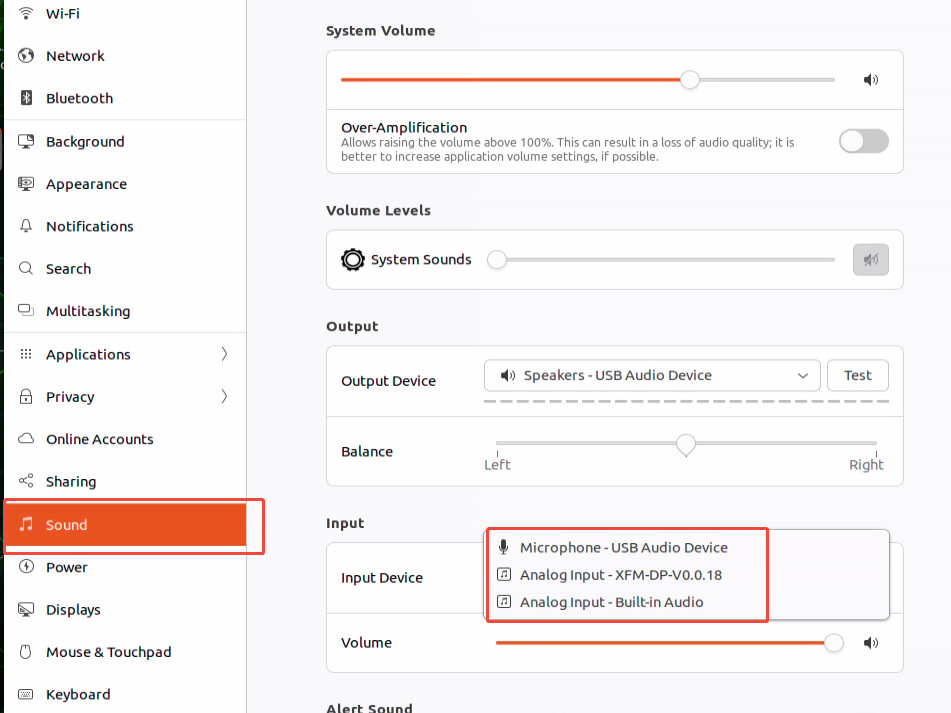
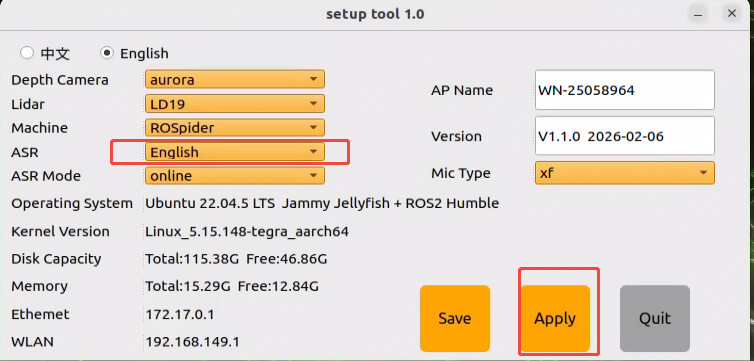
I followed the steps as shown and it still doesn’t work. Here’s the output:
~/.stop_ros.sh
ros2 launch xf_mic_asr_offline voice_control_move.launch.py
[INFO] [launch]: All log files can be found below /home/ubuntu/.ros/log/2026-08-27-14-27-23-644474-ubuntu-7324
[INFO] [launch]: Default logging verbosity is set to INFO
INFO\] \[apply_calib-1\]: process started with pid \[7326
INFO\] \[imu_filter_madgwick_node-2\]: process started with pid \[7328
INFO\] \[joint_state_publisher-3\]: process started with pid \[7330
INFO\] \[robot_state_publisher-4\]: process started with pid \[7332
INFO\] \[ros_robot_controller-5\]: process started with pid \[7334
INFO\] \[ekf_node-6\]: process started with pid \[7336
INFO\] \[oled_show-7\]: process started with pid \[7363
INFO\] \[servo_controller-8\]: process started with pid \[7367
INFO\] \[search_kinematics_solutions-9\]: process started with pid \[7369
INFO\] \[move_controller-10\]: process started with pid \[7377
INFO\] \[ldlidar_stl_ros2_node-11\]: process started with pid \[7381
INFO\] \[scan_to_scan_filter_chain-12\]: process started with pid \[7384
INFO\] \[awake_node.py-13\]: process started with pid \[7386
INFO\] \[voice_control-14\]: process started with pid \[7388
INFO\] \[asr_node.py-15\]: process started with pid \[7394
INFO\] \[voice_control_move.py-16\]: process started with pid \[7403
INFO\] \[init_pose-17\]: process started with pid \[7412
[imu_filter_madgwick_node-2] [INFO] [1787866044.457374701] [imu_filter]: Starting ImuFilter
[imu_filter_madgwick_node-2] [INFO] [1787866044.458002152] [imu_filter]: Using dt computed from message headers
[imu_filter_madgwick_node-2] [INFO] [1787866044.458028681] [imu_filter]: The gravity vector is kept in the IMU message.
[imu_filter_madgwick_node-2] [INFO] [1787866044.458114125] [imu_filter]: Imu filter gain set to 0.100000
[imu_filter_madgwick_node-2] [INFO] [1787866044.458137518] [imu_filter]: Gyro drift bias set to 0.000000
[imu_filter_madgwick_node-2] [INFO] [1787866044.458146062] [imu_filter]: Magnetometer bias values: 0.000000 0.000000 0.000000
[robot_state_publisher-4] [INFO] [1787866044.504719637] [robot_state_publisher]: got segment base_footprint
[robot_state_publisher-4] [INFO] [1787866044.504928830] [robot_state_publisher]: got segment base_link
[robot_state_publisher-4] [INFO] [1787866044.504948319] [robot_state_publisher]: got segment camera_connect_link
[robot_state_publisher-4] [INFO] [1787866044.504958239] [robot_state_publisher]: got segment coxa_LF
[robot_state_publisher-4] [INFO] [1787866044.504965856] [robot_state_publisher]: got segment coxa_LM
[robot_state_publisher-4] [INFO] [1787866044.504972800] [robot_state_publisher]: got segment coxa_LR
[robot_state_publisher-4] [INFO] [1787866044.504979456] [robot_state_publisher]: got segment coxa_RF
[robot_state_publisher-4] [INFO] [1787866044.504985985] [robot_state_publisher]: got segment coxa_RM
[robot_state_publisher-4] [INFO] [1787866044.504992737] [robot_state_publisher]: got segment coxa_RR
[robot_state_publisher-4] [INFO] [1787866044.504999201] [robot_state_publisher]: got segment depth_cam_frame
[robot_state_publisher-4] [INFO] [1787866044.505005857] [robot_state_publisher]: got segment depth_cam_link
[robot_state_publisher-4] [INFO] [1787866044.505088581] [robot_state_publisher]: got segment end_LF
[robot_state_publisher-4] [INFO] [1787866044.505103366] [robot_state_publisher]: got segment end_LM
[robot_state_publisher-4] [INFO] [1787866044.505112326] [robot_state_publisher]: got segment end_LR
[robot_state_publisher-4] [INFO] [1787866044.505118854] [robot_state_publisher]: got segment end_RF
[robot_state_publisher-4] [INFO] [1787866044.505125383] [robot_state_publisher]: got segment end_RM
[robot_state_publisher-4] [INFO] [1787866044.505131975] [robot_state_publisher]: got segment end_RR
[robot_state_publisher-4] [INFO] [1787866044.505138439] [robot_state_publisher]: got segment end_effector_link
[robot_state_publisher-4] [INFO] [1787866044.505145415] [robot_state_publisher]: got segment femur_LF
[robot_state_publisher-4] [INFO] [1787866044.505152136] [robot_state_publisher]: got segment femur_LM
[robot_state_publisher-4] [INFO] [1787866044.505159080] [robot_state_publisher]: got segment femur_LR
[robot_state_publisher-4] [INFO] [1787866044.505165416] [robot_state_publisher]: got segment femur_RF
[robot_state_publisher-4] [INFO] [1787866044.505171689] [robot_state_publisher]: got segment femur_RM
[robot_state_publisher-4] [INFO] [1787866044.505177961] [robot_state_publisher]: got segment femur_RR
[robot_state_publisher-4] [INFO] [1787866044.505184201] [robot_state_publisher]: got segment gripper_link
[robot_state_publisher-4] [INFO] [1787866044.505191017] [robot_state_publisher]: got segment imu_link
[robot_state_publisher-4] [INFO] [1787866044.505197514] [robot_state_publisher]: got segment l_in_link
[robot_state_publisher-4] [INFO] [1787866044.505204010] [robot_state_publisher]: got segment l_link
[robot_state_publisher-4] [INFO] [1787866044.505210794] [robot_state_publisher]: got segment l_out_link
[robot_state_publisher-4] [INFO] [1787866044.505217195] [robot_state_publisher]: got segment leg_center_LF
[robot_state_publisher-4] [INFO] [1787866044.505223723] [robot_state_publisher]: got segment leg_center_LM
[robot_state_publisher-4] [INFO] [1787866044.505230187] [robot_state_publisher]: got segment leg_center_LR
[robot_state_publisher-4] [INFO] [1787866044.505236459] [robot_state_publisher]: got segment leg_center_RF
[robot_state_publisher-4] [INFO] [1787866044.505242956] [robot_state_publisher]: got segment leg_center_RM
[robot_state_publisher-4] [INFO] [1787866044.505249388] [robot_state_publisher]: got segment leg_center_RR
[robot_state_publisher-4] [INFO] [1787866044.505255788] [robot_state_publisher]: got segment lidar_frame
[robot_state_publisher-4] [INFO] [1787866044.505262444] [robot_state_publisher]: got segment lidar_link
[robot_state_publisher-4] [INFO] [1787866044.505269165] [robot_state_publisher]: got segment link1
[robot_state_publisher-4] [INFO] [1787866044.505275821] [robot_state_publisher]: got segment link2
[robot_state_publisher-4] [INFO] [1787866044.505281933] [robot_state_publisher]: got segment link3
[robot_state_publisher-4] [INFO] [1787866044.505288206] [robot_state_publisher]: got segment link4
[robot_state_publisher-4] [INFO] [1787866044.505294318] [robot_state_publisher]: got segment link5
[robot_state_publisher-4] [INFO] [1787866044.505300686] [robot_state_publisher]: got segment r_in_link
[robot_state_publisher-4] [INFO] [1787866044.505306862] [robot_state_publisher]: got segment r_link
[robot_state_publisher-4] [INFO] [1787866044.505313519] [robot_state_publisher]: got segment r_out_link
[robot_state_publisher-4] [INFO] [1787866044.505319951] [robot_state_publisher]: got segment tibla_LF
[robot_state_publisher-4] [INFO] [1787866044.505326383] [robot_state_publisher]: got segment tibla_LM
[robot_state_publisher-4] [INFO] [1787866044.505332527] [robot_state_publisher]: got segment tibla_LR
[robot_state_publisher-4] [INFO] [1787866044.505338960] [robot_state_publisher]: got segment tibla_RF
[robot_state_publisher-4] [INFO] [1787866044.505348592] [robot_state_publisher]: got segment tibla_RM
[robot_state_publisher-4] [INFO] [1787866044.505355440] [robot_state_publisher]: got segment tibla_RR
[ldlidar_stl_ros2_node-11] [INFO] [1787866044.685290878] [LD19]: LDLiDAR SDK Pack Version is: v3.0.3
[ldlidar_stl_ros2_node-11] [INFO] [1787866044.685511591] [LD19]: <product_name>: LDLiDAR_LD19
[ldlidar_stl_ros2_node-11] [INFO] [1787866044.685532104] [LD19]: <topic_name>: scan
[ldlidar_stl_ros2_node-11] [INFO] [1787866044.685545704] [LD19]: <frame_id>: lidar_frame
[ldlidar_stl_ros2_node-11] [INFO] [1787866044.685554505] [LD19]: <port_name>: /dev/lidar
[ldlidar_stl_ros2_node-11] [INFO] [1787866044.685561961] [LD19]: <port_baudrate>: 230400
[ldlidar_stl_ros2_node-11] [INFO] [1787866044.685569417] [LD19]: <laser_scan_dir>: Counterclockwise
[ldlidar_stl_ros2_node-11] [INFO] [1787866044.685577546] [LD19]: <enable_angle_crop_func>: true
[ldlidar_stl_ros2_node-11] [INFO] [1787866044.685585258] [LD19]: <angle_crop_min>: 120.000000
[ldlidar_stl_ros2_node-11] [INFO] [1787866044.685604523] [LD19]: <angle_crop_max>: 240.000000
[ldlidar_stl_ros2_node-11] [INFO] [1787866044.698958246] [LD19]: ldlidar node start is success
[ldlidar_stl_ros2_node-11] [INFO] [1787866044.704527668] [LD19]: ldlidar communication is normal.
[ldlidar_stl_ros2_node-11] [INFO] [1787866044.708525695] [LD19]: Publish topic message:ldlidar scan data.
[voice_control-14] appid:3f498ac9
[voice_control-14] >>>>>denoise_sound_path :/home/ubuntu/ros2_ws/src/xf_mic_asr_offline/audio/vvui_deno.pcm
[voice_control-14] [INFO] [1787866044.815993362] [voice_control]: Initialization Offline resource parameter success!
[scan_to_scan_filter_chain-12] [WARN] [1787866045.638668357] [scan_to_scan_filter_chain]: diagnostic_updater: No HW_ID was set. This is probably a bug. Please report it. For devices that do not have a HW_ID, set this value to ‘none’. This warning only occurs once all diagnostics are OK. It is okay to wait until the device is open before calling setHardwareID.
[joint_state_publisher-3] [INFO] [1787866046.130870122] [joint_state_publisher]: Waiting for robot_description to be published on the robot_description topic…
[awake_node.py-13] [INFO] [1787866046.508889791] [awake_node]: Wake up word: hello hi wonder
[awake_node.py-13] [INFO] [1787866046.527982534] [awake_node]: start
[move_controller-10] 7377 (process ID) old priority 0, new priority -19
[voice_control_move.py-16] /home/ubuntu/.local/lib/python3.10/site-packages/numpy/core/getlimits.py:549: UserWarning: The value of the smallest subnormal for <class ‘numpy.float64’> type is zero.
[voice_control_move.py-16] setattr(self, word, getattr(machar, word).flat[0])
[voice_control_move.py-16] /home/ubuntu/.local/lib/python3.10/site-packages/numpy/core/getlimits.py:89: UserWarning: The value of the smallest subnormal for <class ‘numpy.float64’> type is zero.
[voice_control_move.py-16] return self._float_to_str(self.smallest_subnormal)
[apply_calib-1] [INFO] [1787866047.006591097] [imu_calib]: Calibrating gyros; do not move the IMU
[ros_robot_controller-5] [INFO] [1787866047.055950614] [ros_robot_controller]: start
[servo_controller-8] [INFO] [1787866047.059139356] [servo_manager]: start
[servo_controller-8] [INFO] [1787866047.370850582] [controller_manager]: start
[search_kinematics_solutions-9] [INFO] [1787866047.612790361] [arm_kinematics]: start
INFO\] \[oled_show-7\]: process has finished cleanly \[pid 7363
[init_pose-17] [INFO] [1787866048.330086675] [init_pose]: start
[apply_calib-1] [INFO] [1787866049.102212120] [imu_calib]: Gyro calibration complete! (bias = [-0.005, -0.023, -0.005])
[imu_filter_madgwick_node-2] [INFO] [1787866049.123623507] [imu_filter]: First IMU message received.
[asr_node.py-15] /home/ubuntu/.local/lib/python3.10/site-packages/numpy/core/getlimits.py:549: UserWarning: The value of the smallest subnormal for <class ‘numpy.float64’> type is zero.
[asr_node.py-15] setattr(self, word, getattr(machar, word).flat[0])
[asr_node.py-15] /home/ubuntu/.local/lib/python3.10/site-packages/numpy/core/getlimits.py:89: UserWarning: The value of the smallest subnormal for <class ‘numpy.float64’> type is zero.
[asr_node.py-15] return self._float_to_str(self.smallest_subnormal)
[asr_node.py-15] /home/ubuntu/.local/lib/python3.10/site-packages/numpy/core/getlimits.py:549: UserWarning: The value of the smallest subnormal for <class ‘numpy.float32’> type is zero.
[asr_node.py-15] setattr(self, word, getattr(machar, word).flat[0])
[asr_node.py-15] /home/ubuntu/.local/lib/python3.10/site-packages/numpy/core/getlimits.py:89: UserWarning: The value of the smallest subnormal for <class ‘numpy.float32’> type is zero.
[asr_node.py-15] return self._float_to_str(self.smallest_subnormal)
[voice_control_move.py-16] /home/ubuntu/.local/lib/python3.10/site-packages/numpy/core/getlimits.py:549: UserWarning: The value of the smallest subnormal for <class ‘numpy.float32’> type is zero.
[voice_control_move.py-16] setattr(self, word, getattr(machar, word).flat[0])
[voice_control_move.py-16] /home/ubuntu/.local/lib/python3.10/site-packages/numpy/core/getlimits.py:89: UserWarning: The value of the smallest subnormal for <class ‘numpy.float32’> type is zero.
[voice_control_move.py-16] return self._float_to_str(self.smallest_subnormal)
[asr_node.py-15] [INFO] [1787866053.840353369] [asr_node]: start
[voice_control_move.py-16] [INFO] [1787866054.007560510] [voice_control_move]: 唤醒口令: 小幻小幻(Wake up word: hello hiwonder)
[voice_control_move.py-16] [INFO] [1787866054.008576520] [voice_control_move]: 唤醒后15秒内可以不用再唤醒(No need to wake up within 15 seconds after waking up)
[voice_control_move.py-16] [INFO] [1787866054.010232523] [voice_control_move]: 控制指令: 左转 右转 前进 后退 过来 跳个舞吧(Voice command: turn left/turn right/go forward/go backward/come here /dance)
[voice_control_move.py-16] [INFO] [1787866055.835334868] [voice_control_move]: I am ready
I took a video as requested but your form won’t let me upload it; it says it requires a trust level of 1 or higher. However, the video just shows the output that i pasted and that I was facing the spider. In the video, the spider says “I’m ready” but the output sits there and does nothing when I say “hello hiwonder”. Please adivse on how to upload the video without the trust level error. Thank you
Using this template is recommended — you may also edit it freely, but you must fully describe your product and the problem (at least: product name, version, and problem description).