Using this template is recommended — you may also edit it freely, but you must fully describe your product and the problem (at least: product name, version, and problem description).
Product and Purchase
- Product model: Hiwonder PuppyPi ROS Quadruped Robot with Raspberry Pi 2024
- SKU or kit name:
- Purchase channel:
- Controller board: RaspberryPi
Software and Environment
- Operating system:
- Connection method:
- Software version:
- Firmware version:
- Image version:
- Tutorial step:
Issue Descriptio
- I am working on a new project using a PuppyPi which has been previously used, and I requested system image information from Hiwonder to reflash the Pi. This is a Raspberry Pi 4B currently operating on a 32GB sd card, so I expected the fresh system image file to fit within that size limitation. The PuppyPi currently boots with no issues and runs well with the Hiwonder app commands.
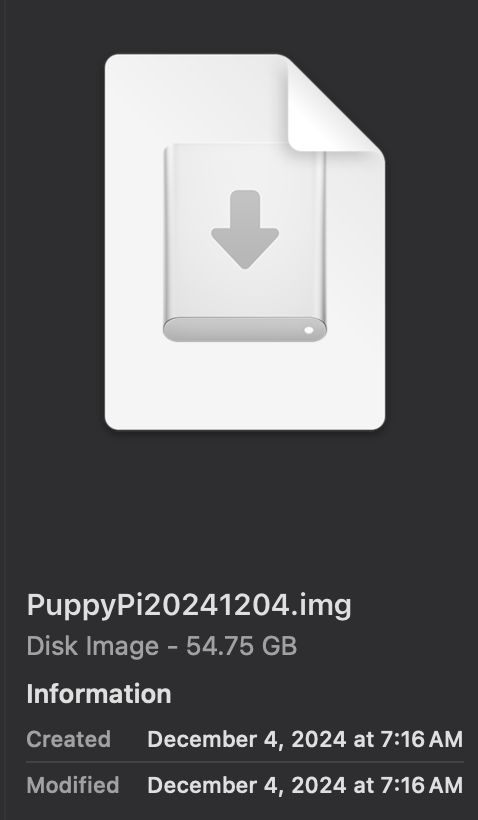
- They provided the files via email which I downloaded and successfully unzipped to create the .img, but the file size was ultimately 54.75 GB. This was concerning as it exceed the capacity of the current SD card.
- Error message or logs: N/A
Evidence
- Screenshot:
What You Have Tried
-
Re-unzipping the files, to no success.
-
I tried shrinking the files via reformatting down to 32GB, but this was always beneath the minimum file size.
Urgency
- This is for a lab project; I would like to ideally reflash the Pi this week if possible, but it is not tremendously urgent; next week would be okay.
Thank you!